

How to Open a Bank Account Online: Step-by-Step Guide
Last updated on January 8, 2026
Everything You Need to Know About Opening a Bank Account Online
Opening a bank account used to mean waiting in line at a branch. Today, anyone can open a bank account online from home in just a few minutes.
California Credit Union makes this easy — you can live anywhere in the U.S. and open your account online. Plus, when new members open an eChecking account, you’ll receive a $250 bonus after meeting the requirements.
Key Takeaways
- Opening a bank account online can take just a few minutes, and all you need to do is provide basic personal information, your Social Security number, a government-issued ID and money for an initial deposit
- California Credit Union offers online account opening to anyone in the U.S. with a $250 eChecking bonus for new members who meet requirements
- The online bank account verification process typically takes 1-3 business days, though some banks and credit unions may approve you immediately
- To open a bank account online, you’ll need to fund your new account through electronic transfers from an existing bank account or debit card
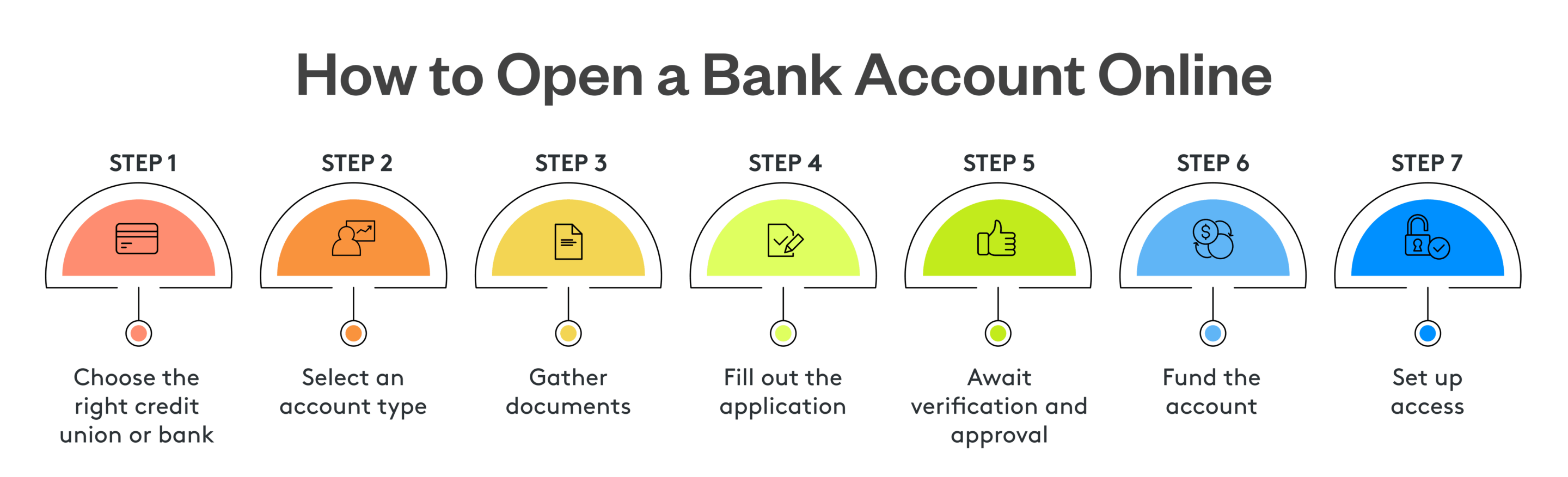
1. Choose the Right Credit Union or Bank
Before opening a bank account online, take time to consider what matters most to you. The difference between a bank vs. credit union comes down to structure. Banks are for-profit and shareholder-owned, while credit unions are member-owned cooperatives that return profits through features like better rates and lower fees.
When comparing bank accounts, look at monthly fees, minimum balance requirements, ATM access and interest rates.
2. Select an Account Type
When opening your new account, or if you're opening your first bank account, it’s a good idea to start with a checking account, a savings account or both. Here are the main options to consider:
- Checking account: This is your everyday spending account where paychecks get deposited. A checking account gives you a debit card and includes online bill pay, mobile check deposits and payment features for everything from rent to regular expenses
- Savings account: A savings account helps your money grow through compound interest. Having one of these accounts is one of the simplest ways to learn how to save money, and keeping it separate from your checking account helps you avoid impulse spending
- Money market account: A money market account blends the benefits of both checking and savings accounts. This hybrid account often offers higher interest rates for maintaining a larger minimum balance, along with checking features like ATM access and check-writing abilities. They’re ideal for larger emergency funds or money you want to set aside for specific goals
3. Gather Documents
Gather your documents before you start the online bank account application process. Here’s what documents are often required to open a bank account online:
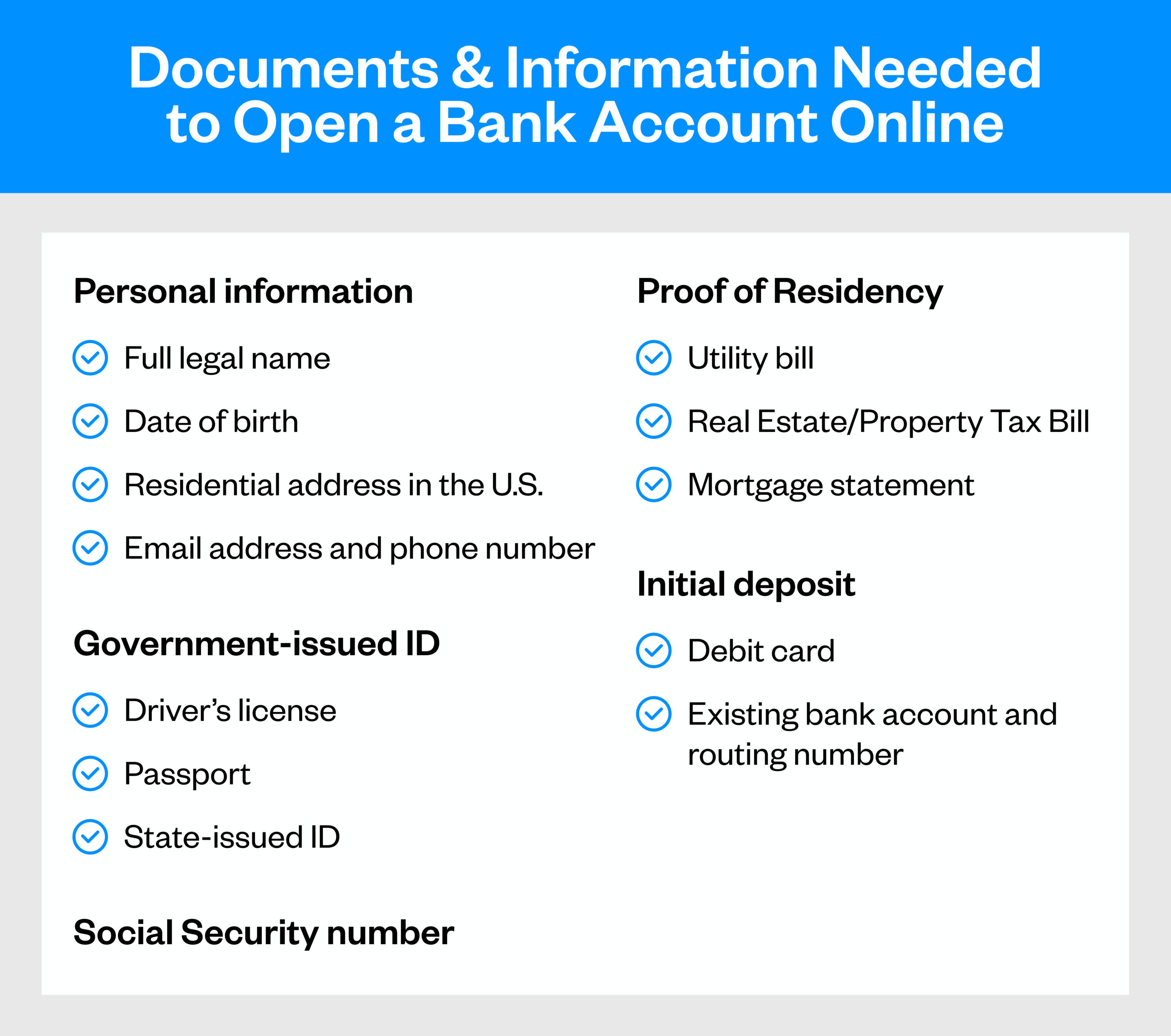
Keep in mind that some applications may require additional documentation. If you’re opening a joint account, both account holders need to provide their personal information and identification. For student or teen accounts, a parent or guardian will need to provide their information and co-sign.
4. Fill Out the Application
Once you’ve gathered your documents, applying for a bank account virtually is straightforward. You’ll enter personal details, verify your identity, choose account features and agree to terms.
Visit the institution’s website and find its “Open an Account” button. The application starts with basic information like your name and address, then moves to uploading your ID and providing your Social Security number.
Pay attention to optional features. Applications often ask about paper statements, overdraft protections, or linked savings. Most applications take just a few minutes, and many save your progress if you need to step away. And if you have questions, our Virtual Branch is just a call or live chat away for help.
5. Await Verification and Approval
After submission, the bank verifies your identity and information. The online bank account verification process is required by federal regulations to prevent fraud.
Verification happens in two ways. Some institutions might use instant systems that check information against databases in real-time. Then, if everything matches, you’re approved in minutes. Other banks might manually review applications, which can take a few business days.
You’ll get an email or text once approved. If there’s an issue processing your application, the bank will reach out with specific instructions. If that happens, make sure to respond quickly to avoid delays.
6. Fund the Account
Most accounts require a deposit to activate, ranging from $25 to $100 or more.
The most common method to fund your account is linking another bank account. Provide your account and routing numbers, and the bank will initiate an electronic transfer that can take 2-3 business days to go through. Some banks accept debit card transfers, which can be faster but might come with a small fee.
7. Set Up Access
Once your bank account is funded, you’ll need to set up your online and mobile access. For all bank accounts, you should have a strong password and two-factor authentication enabled if available. The security of your account depends on both the bank’s protections and your own habits. You should use unique passwords and monitor your account regularly.
Next, you can sign in on mobile by downloading the bank or credit union’s mobile app, if available. This is where you can deposit checks, pay bills, and monitor spending. Explore the features of the app and set up alerts for low balances or large purchases.
If your bank offers digital wallet connection, add your debit card to Apple Pay or Google Pay for convenient, secure payments when shopping.
For longer-term goals like saving for retirement, set up automatic transfers from checking to savings.
Open Your Bank Account Online Today
Opening a bank account online is straightforward, and it’s become normal for starting banking relationships. Whether opening your first account or learning how to switch banks for better rates and service, the online process puts you in control.
California Credit Union makes getting started simple. Whether you’re opening a checking account, savings account or both, you’ll find competitive rates and no hidden fees. You’ll get everything needed to manage your money effectively. Open your account and start building a stronger financial foundation today.